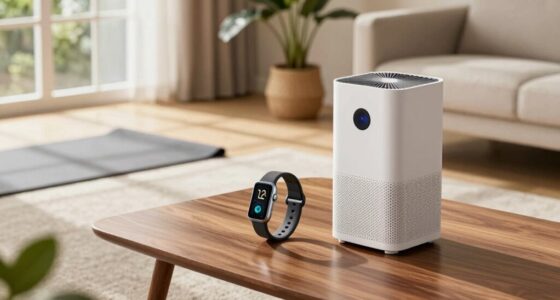
Set up at-home wellness gadgets so you can track habits such as activity, sleep, weight, or room conditions and decide what changes may help your routine. This guide is for beginners choosing everyday consumer devices, including fitness trackers, smart scales, sleep sensors, and air-quality monitors. Plan for 30-60 minutes to set up one or more devices, then use them for 1-2 weeks before judging patterns.

Get wellness gear delivered free with Prime
- Fast, free delivery on millions of items
- Prime Video, Amazon Music and more included
- Member-only deals all year

Etekcity Smart Body Weight Scale with Body Fat and BMI Tracking
- ✔ Brand: Etekcity
- ✔ Capacity: 400 lb / 180 kg / 28 st
- ✔ Measurement increments: 0.05 lb / 0.02 kg at lower weights; 0.1 lb / 0.05 kg above 10 kg
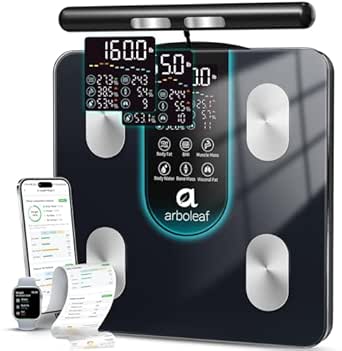
arboleaf Smart Scale with Dual-Frequency 8-Electrode BIA
- ✔ Model: CS10K
- ✔ Measurement technology: Dual-frequency BIA with eight electrodes
- ✔ Maximum capacity: 400 pounds

REVO Original 4-in-1 Smart Cupping Massager with Heat, Vibration, LED Light, and Dynamic Suction
- ✔ Functions: Dynamic suction cupping, vibration massage, LED light, adjustable heat
- ✔ Intensity levels: 12
- ✔ Power: Cordless and rechargeable
These gadgets can support awareness and habit building. Their readings are estimates and do not replace medical advice, diagnosis, or care.
Difficulty: Beginner | Time: 30-60 minutes for setup; 1-2 weeks to establish a useful routine
What You’ll Need
Tools & Materials:
- A phone or tablet compatible with the device app
- Home Wi-Fi or Bluetooth, if required by the device
- Charging cable, batteries, or power adapter specified by the manufacturer
- A stable, dry surface for devices such as a smart scale
- The device manual and its privacy settings
Knowledge:
- Basic use of a smartphone and app store
- A general idea of what habit or home condition you want to monitor
- Willingness to follow the manufacturer’s setup and cleaning directions
Set aside 30-60 minutes for installation and account setup. Check your phone’s operating-system requirements, Wi-Fi band requirements, and device return policy before opening the package. If you have a health condition, use medication affected by activity or sleep, or plan to rely on readings for care decisions, discuss the device and its limits with a qualified healthcare professional.
Etekcity Smart Body Weight Scale with Body Fat and BMI Tracking
The Etekcity Smart Body Weight Scale is the most adaptable pick for a home where more than one person may use the same device. It tracks 13 biometrics through the VeSync app, with progress graphs and personalized health plans to help turn occasional weigh-ins into a consistent record. Bluetooth syncing and compatibility with popular health apps and Apple Watch can make that record easier to keep alongside other wellness data.Its most distinctive advantage over the arboleaf scale is practical flexibility: Etekcity includes zero-current, baby, and light-item modes, including weighing items down to 100 g. That can make the scale useful beyond individual weigh-ins. arboleaf, by comparison, is the stronger fit when on-scale body composition detail and a larger set of app metrics matter more. Etekcity’s 13 metrics are substantial, though its offering is less specialized than arboleaf’s 50-plus metrics and segmental views.We would choose Etekcity for a household that values simple repeat use and broad compatibility. The tradeoff is that some app functions may depend on operating system version, and the product is not intended for professional athletes. As with any connected scale, the app is part of the experience, so buyers should check device compatibility before relying on its plans and syncing.
Pros:
- Tracks 13 biometrics with app-based progress graphs and personalized plans.
- Supports unlimited users and syncs with popular health apps and Apple Watch.
- Includes baby, zero-current, and light-item weighing modes.
- Large LED display and tempered-glass platform.
Cons:
- Some app features may be unavailable or vary on older operating systems.
- Not intended for professional athletes.
Best for: Households wanting one connected scale for multiple users, regular progress tracking, and occasional baby or light-item weighing.
Not ideal for: Buyers seeking professional-grade body composition analysis or those whose older phone operating system may not support desired app features.
Bottom line: For the broadest everyday household use in this lineup, Etekcity balances app tracking and flexible weighing modes better than the more specialized arboleaf scale.
“For the broadest everyday household use in this lineup, Etekcity balances app tracking and flexible weighing modes better than the more specialized arboleaf scale.”
arboleaf Smart Scale with Dual-Frequency 8-Electrode BIA
The arboleaf Smart Scale is the data-heavy choice for buyers who want more than weight and a few basic estimates. Its dual-frequency, eight-electrode BIA system measures and displays seven key readings, including BMI, body fat, muscle mass, body water, bone mass, and visceral fat. The app adds more than 50 metrics, segmental views, charts, and reports, which makes this a more detailed tracking setup than Etekcity’s 13-biometrics approach.That depth comes with a sharper learning curve. The arboleaf scale requires app pairing and profile setup before first use, and supports up to eight profiles with automatic recognition. Etekcity is the more flexible household option, particularly for unlimited users and baby or light-item modes; arboleaf is better suited to a defined group of users who want to follow body composition estimates over time. Its large display also puts several measurements on the scale itself, reducing the need to open the app for every reading.We should treat these readings as long-term trend indicators, not a substitute for professional analysis. The manufacturer also says not to use this scale if pregnant or if you have a pacemaker. For buyers to whom those restrictions apply, Etekcity offers a more appropriate scale alternative from this lineup, although its measurements also should not be confused with a clinical assessment.
Pros:
- Eight electrodes and dual-frequency BIA support detailed body composition estimates.
- Displays seven key measurements directly on the scale.
- App includes 50-plus metrics, trend charts, segmental views, and reports.
- Recognizes up to eight user profiles automatically and syncs with popular health apps.
Cons:
- BIA readings are estimates for long-term trends, not professional analysis.
- Not suitable for people with pacemakers or those who are pregnant.
- Requires app pairing and profile setup before first use.
Best for: People who want a detailed at-home record of body composition trends and are comfortable completing app and profile setup.
Not ideal for: People who are pregnant or have a pacemaker, or buyers who want clinical body composition analysis or minimal setup.
Bottom line: Choose arboleaf over Etekcity when richer body composition views matter more than simpler setup and broader household weighing modes.
“Choose arboleaf over Etekcity when richer body composition views matter more than simpler setup and broader household weighing modes.”
REVO Original 4-in-1 Smart Cupping Massager with Heat, Vibration, LED Light, and Dynamic Suction
The REVO Original 4-in-1 Smart Cupping Massager takes a different route to at-home wellness from the two scales: it is a hands-on device for massage and self-care, rather than a way to record body metrics. Its combination of dynamic suction, vibration, adjustable heat, and LED light lets users combine functions or operate them independently. Twelve intensity levels offer room to adjust the experience instead of settling for a single fixed setting.Compared with Etekcity and arboleaf, REVO is the only pick here that directly supports a massage routine. That makes it a better match for someone looking for a cordless device they can use at home or carry between locations, while both scales are stronger choices for measurement habits and progress records. The tradeoff is that REVO does not offer the tracking, profiles, or app-based history provided by the scales, so it cannot serve as a general wellness dashboard.The product description lists a single device per pack. Buyers who want to place devices on two areas at once would need a second unit, which adds to the setup they must assemble. This pick makes the most sense when its specific massage functions are the priority; anyone mainly seeking data about weight or body composition should choose one of the other two products.
Pros:
- Combines dynamic suction cupping, vibration, adjustable heat, and LED light.
- Twelve intensity levels allow a more adjustable routine.
- Cordless and rechargeable for use away from a fixed outlet.
- Functions can be used separately or together.
Cons:
- A single pack includes only one device.
- Dual placement requires a second unit.
- Does not provide the measurement history or health app tracking offered by the scales.
Best for: People who want a cordless, adjustable cupping and massage device with several functions in one unit.
Not ideal for: Buyers seeking weight or body composition tracking, or those who want dual placement from one purchase.
Bottom line: REVO is the clear choice for a multifunction massage routine, but it cannot replace either scale for buyers whose main goal is tracking wellness measurements.
“REVO is the clear choice for a multifunction massage routine, but it cannot replace either scale for buyers whose main goal is tracking wellness measurements.”
As an Amazon Associate we earn from qualifying purchases.
Before You Start
Pick one purpose first, such as noticing daily movement, keeping a consistent bedtime, or checking ventilation. Avoid buying several devices that measure the same thing before you know which information you will use. Review the app’s data-sharing choices before creating an account, and use a unique password. Do not use a consumer gadget to diagnose symptoms or change medication.
For electrical devices, keep them away from water and use only the supplied or manufacturer-approved power accessories. Stop using a device that overheats, has a damaged cable, or causes skin irritation.
Step-by-Step Instructions
Step 1: Choose the measurement that matches your goal
Write down one question you want the device to help answer. For example: “Am I moving regularly during the workday?” points to a fitness tracker, while “Does my bedroom get stuffy overnight?” points to an air-quality monitor. Compare devices by the measurement they provide, the app and phone compatibility, recurring fees, battery life, accessibility, and whether the data can be exported or deleted.
Check what the gadget actually measures. A sleep tracker may estimate sleep stages from movement and heart rate; it does not directly confirm a sleep disorder. A smart scale estimates body composition through an electrical signal and should not be treated as a precise clinical measurement.
Tip: Prefer a simple device that answers your question over a model with features you are unlikely to use.
Check: You can state the single habit or condition you plan to monitor and have confirmed the device supports your phone and home setup.
Step 2: Prepare the space and read the setup directions
Place the device where you will use it consistently, following its manual. Put a smart scale on a hard, level floor rather than carpet. Position an air-quality monitor at the height and location recommended by its maker, away from open windows, vents, cooking appliances, and direct sunlight unless the manual says otherwise. Choose a charging spot for a wearable that is dry and easy to reach.
Read the safety, cleaning, and calibration instructions before powering the device. Check for included batteries, protective films, and any required sensor placement. Keep the packaging until you know the device works and fits your needs.
Tip: Placement changes readings. Keep the location and conditions consistent when you want to compare results over time.
Check: The device has a suitable, safe location and you know what its manual requires before setup.
Step 3: Install the app and review privacy choices
Download the manufacturer’s official app from your phone’s app store. Confirm the developer name matches the product documentation. Create an account only if required, set a unique password, and grant only the permissions needed for the features you intend to use. For example, a fitness tracker may need Bluetooth; location access may be optional for route mapping.
Open the privacy settings and review cloud syncing, sharing with third parties, account visibility, and data deletion options. Turn off optional sharing you do not want. Do not enter sensitive health information into a field unless you understand how the provider stores and uses it.
Tip: App menus vary by model; use the current manual or support page for exact labels.
Check: The official app opens, the account is secure, and the permissions and data-sharing choices match your preferences.
Step 4: Power on, pair, and configure the gadget
Charge or install batteries as directed, then power on the device. Keep it close to your phone and follow the app’s pairing prompts. Allow Bluetooth or Wi-Fi access when needed for the functions you selected. If the app asks for personal details such as age, height, or weight, enter accurate information or skip optional fields; incorrect entries can distort estimates.
Set units, time zone, display preferences, and any reminders you want. For a wearable, adjust the band so it is secure but comfortable and follow the recommended placement. For a smart scale, add a user profile only if you need separate records, and check how the scale distinguishes users.
Tip: Do not pair through the phone’s Bluetooth menu unless the manual instructs you to; many devices pair inside their app.
Check: The app identifies the device, shows its battery or connection status, and displays the settings you selected.
Step 5: Complete any setup checks or calibration
Follow the manufacturer’s calibration or initial-reading procedure. Some scales require you to step on briefly and step off; some monitors need a warm-up period; some wearables ask you to confirm a fit or baseline. Keep the device still and in the specified environment while it completes the process. Do not invent a calibration method if the instructions do not call for one.
Check that the displayed units make sense, such as kilograms versus pounds or Celsius versus Fahrenheit. If the app shows an error, consult its help instructions before repeating the setup.
Tip: A single first reading may be atypical while the device learns or stabilizes. Avoid drawing conclusions from it.
Check: The app reports setup or calibration complete, and the device shows a plausible reading or ready status.
Step 6: Use the device consistently for a short trial
Choose a repeatable time and routine. Wear a tracker as directed during the activities you want to monitor. Weigh yourself under similar conditions if you use a scale, such as at the same time of day and on the same floor. Leave a room monitor in the same location and note relevant changes such as cooking or opening a window. Record only the context that helps interpret the measurement.
Use the device for 1-2 weeks before deciding whether a trend matters. Focus on a few measures connected to your goal, and ignore scores or alerts that do not help you take a useful action.
Tip: Comfort matters. If a wearable irritates your skin or interferes with sleep, remove it and follow the maker’s cleaning and fit advice.
Check: You have several comparable readings and can see how the app records them without needing to check it constantly.
Step 7: Review patterns and choose one practical adjustment
At the end of your trial, review the trend view alongside your notes. Ask whether the readings changed with a specific routine or environment. Choose one small action to try, such as taking a brief walking break, moving bedtime earlier, or ventilating a room when appropriate. Keep the change manageable and continue observing under similar conditions.
If a reading is unexpected, repeat it according to the device instructions and check placement, fit, battery, units, and connectivity. Treat persistent symptoms or concerning readings as a reason to contact a healthcare professional, not as a reason to rely on the gadget alone.
Tip: A gadget is useful when its information helps you make a reasonable choice, not when it creates pressure to chase a perfect score.
Check: You can describe one pattern, one limitation of the measurement, and one sensible action or reason to seek professional advice.
Common Mistakes to Avoid
- Buying multiple gadgets before identifying a need. — Start with one device that answers a specific question. Add another only when you know what extra information would change your routine.
- Comparing readings taken in different conditions or from different devices. — Keep timing, placement, fit, and units consistent. Compare a device with its own trends rather than assuming different brands use the same methods.
- Treating estimated scores as diagnoses or precise measurements. — Read the device’s stated limitations. Use consumer readings for general awareness and discuss health concerns with a qualified professional.
- Allowing more app permissions or data sharing than needed. — Review permissions during setup and revisit privacy settings after app updates. Disable optional sharing and delete the account data you no longer want stored.
Troubleshooting
Problem: The app cannot find or pair with the device.
Solution: Charge or power on the gadget, move it close to the phone, and confirm Bluetooth or required Wi-Fi is enabled. Close and reopen the app, then use its pairing flow. If it is already linked to another phone or account, follow the manufacturer’s unlink or reset directions.
Problem: The device shows no readings or stops syncing.
Solution: Check battery level, app permissions, network connection, and the device’s required wear or placement. Open the app while the device is nearby to trigger a sync. Restart both only as directed by the maker; check for app or firmware updates if the issue continues.
Problem: Readings vary widely from one use to the next.
Solution: Repeat the measurement using the same time, position, surface, and fit. Confirm the correct user profile and units. Review the manual for environmental limits, calibration steps, or factors that can affect the sensor.
Problem: An alert or reading causes concern.
Solution: Check the manual to understand what the alert means and repeat the measurement only if the instructions recommend it. Do not use the device to diagnose yourself or delay care. Contact a healthcare professional for medical concerns; seek urgent help for severe or sudden symptoms.
What Success Looks Like
Your device is safely placed or comfortably worn, connects to its official app, and records readings under repeatable conditions. After 1-2 weeks, you can identify a useful pattern or confirm that the device is not helping your goal. You understand that the readings are estimates and know when a health concern calls for professional advice.
Next Steps
Keep the device clean and charged according to its manual, review permissions after major app updates, and repeat your short review after a few weeks if your routine changes. Remove unused gadgets from your account and delete stored data through the provider’s controls if you stop using them. If the device creates anxiety, disrupts sleep, or encourages unsafe behavior, pause tracking and discuss the concern with a healthcare professional.
Frequently Asked Questions
Which wellness gadget should I start with?
Start with the device that answers your clearest question. A fitness tracker can help you notice movement habits, while an air-quality monitor can show changes in a room. You do not need a smart scale or sleep tracker unless its information would guide an action you actually plan to take.
Are smart scales and sleep trackers accurate?
They provide estimates using sensors and algorithms, and results can vary with conditions, fit, and model. Use the same device consistently to observe broad patterns. Do not treat its body-composition or sleep-stage labels as clinical measurements.
Do I need to wear a fitness tracker all day?
No. Follow the maker’s wear instructions and wear it only when it is comfortable and useful for your goal. You can also remove it for charging, bathing if it is not water-rated, or whenever it irritates your skin.
Should I share wellness data with a clinician?
Ask first what information would help with your care. If you share data, explain the device model and how you collected the readings. A clinician can help interpret them in context, but the gadget’s app report does not replace an examination or medical record.