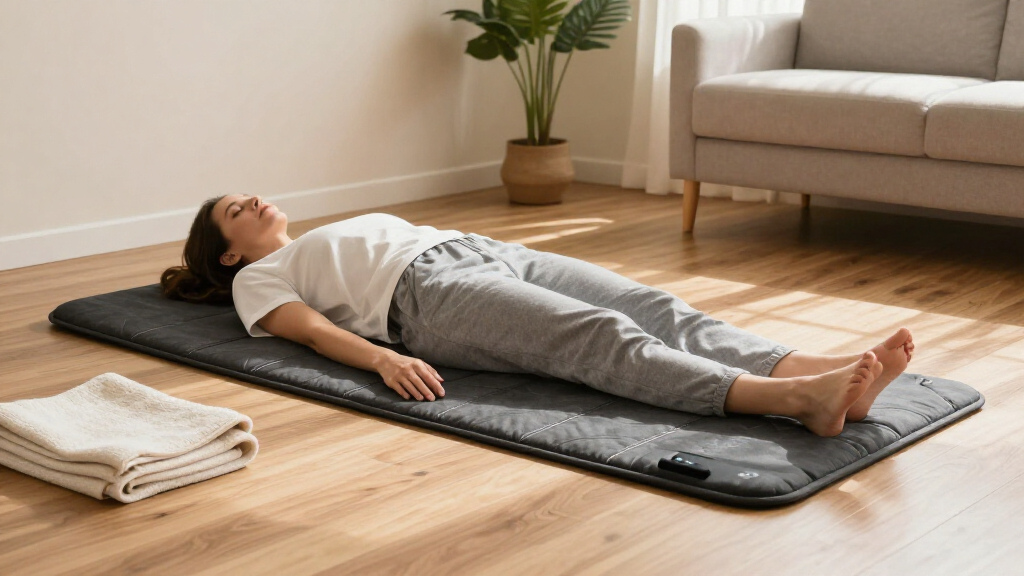

Use this guide to prepare an infrared therapy mat, set it up, complete a cautious first session, and check the mat afterward. It is for adults who are new to these devices and want practical steps for using a specific mat at home. Follow the instructions supplied with your model whenever they differ from general guidance here. Allow 30-45 minutes for reading the manual, setup, and a short first session.

Get wellness gear delivered free with Prime
- Fast, free delivery on millions of items
- Prime Video, Amazon Music and more included
- Member-only deals all year

Comfytemp Red Light Therapy Pad for Body, 41.5" x 26", 660nm & 850nm
- ✔ Dimensions: 41.5 x 26 inches
- ✔ Wavelengths: 660 nm red, 850 nm near-infrared
- ✔ Lamp beads: 560 dual-chip beads
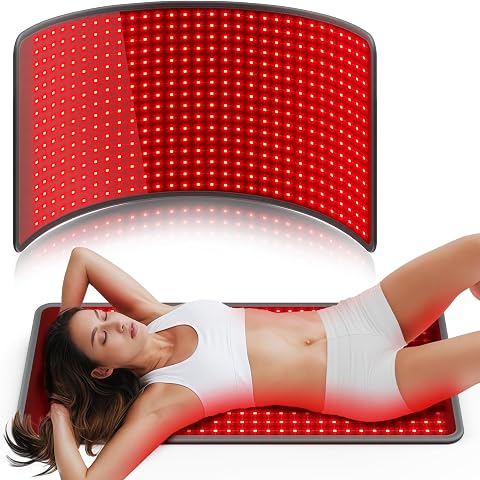
Comfytemp Red Light Therapy Mat for Body, 33" x 17", 660nm & 850nm
- ✔ Dimensions: 33 x 17 inches
- ✔ Wavelengths: 660 nm and 850 nm
- ✔ LED count: 480
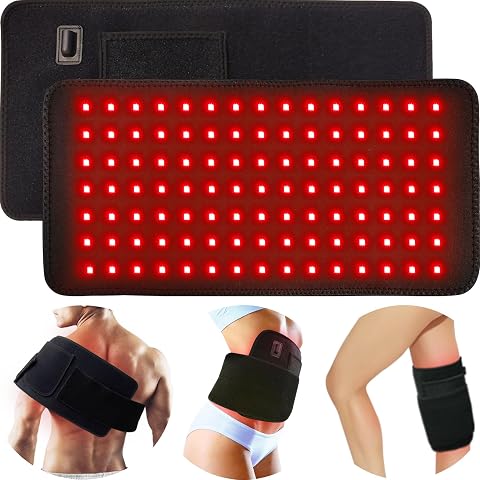
Corded Red Light Therapy Pad with 3-in-1 Chips for Body, Back, Knee, Shoulder, Hands, Feet – 660nm Red + 850nm NIR, Adjustable Wr…
- ✔ Pad dimensions: 16.1 x 7.9 inches
- ✔ Strap: 35.2 x 4 inches
- ✔ LED count: 315 (105 beads x 3 chips each)
An infrared mat produces heat and may contain other features, such as stones, crystals, or pulsed electromagnetic field settings. The device’s features and instructions vary by model. This guide explains use and basic precautions; it does not establish that a mat treats or cures a health condition.
Difficulty: Beginner | Time: 30-45 minutes for setup and a first session
What You’ll Need
Tools & Materials:
- Infrared therapy mat and its manufacturer’s manual
- A dry, flat, stable surface near a suitable power outlet
- A timer or clock
- A clean sheet or towel, if the manual permits or recommends one
Knowledge:
- Ability to read the mat’s control panel and follow its manual
- Awareness of your own heat sensitivity and ability to stop a session if you feel unwell
Read the manual before plugging in the mat. Check the listed power requirements and any warnings about medical conditions, pregnancy, medications, or implanted devices. If a warning may apply to you, ask a qualified healthcare professional before use. Do not use the mat to replace prescribed care.
Comfytemp Red Light Therapy Pad for Body, 41.5" x 26", 660nm & 850nm
When we want one surface that can span multiple body areas, the 41.5-by-26-inch Comfytemp pad is the strongest fit in this lineup. Its 560 dual-chip lamp beads are listed across the largest area here, and the stated combination of 660 nm red and 850 nm near-infrared matches the wavelength pairing on the other two products. The advantage is primarily coverage: compared with the 33-by-17-inch Comfytemp mat, this pad gives us more room to position the light without shifting a smaller panel as often.Its four modes, three intensity levels, and one-button operation keep the controls straightforward. That simplicity may suit someone setting up sessions at home, including users who prefer fewer steps. Still, its large format is less focused than the bonodave wrap, which has a strap to secure the smaller pad to a selected area. The product notes also caution that clothing thickness or color can reduce light effectiveness, so we should consider how we plan to place the pad and follow the maker’s instructions. Choose it for maximum listed surface area; skip it if targeted strapping or a more compact footprint matters more.
Pros:
- Largest listed surface in this comparison at 41.5 by 26 inches.
- 560 dual-chip beads pair 660 nm red with 850 nm near-infrared.
- Four modes and three intensity levels offer setting choices.
- One-button operation keeps setup simple.
Cons:
- Clothing thickness or color can reduce light effectiveness.
- The large format is less suited to securing around a single body part than a strapped wrap.
- The supplied details do not state irradiance or measured light output.
Best for: Home users who want the largest listed surface for positioning across multiple body areas.
Not ideal for: Shoppers who need a secured wrap for one joint or body part, or who expect to use the light through clothing.
Bottom line: We rank this first for its broadest listed coverage and simple controls, provided its size suits the intended placement.
“We rank this first for its broadest listed coverage and simple controls, provided its size suits the intended placement.”
Comfytemp Red Light Therapy Mat for Body, 33" x 17", 660nm & 850nm
The 33-by-17-inch Comfytemp gives us a useful middle ground: it is considerably smaller than the 41.5-by-26-inch pad, but its listed coverage is broader than the bonodave wrap’s 16.1-by-7.9-inch pad. That makes it the more plausible choice when we want a mat-like surface for home placement without committing to the largest option in the group. Its 480 LEDs and dual wavelengths are paired with four modes and three intensity levels, giving users several listed settings to choose from.Compared with the larger Comfytemp, this model trades surface area for a more compact footprint; compared with bonodave, it lacks the described adjustable strap for holding the pad against a particular body part. The description calls it plug-and-play, but it still requires a power outlet, so it is not a travel-friendly cordless pick. We would choose it for a balance of coverage and configurable controls, not because its LED count alone tells us how much light reaches the treatment area—the provided information does not include a comparable irradiance figure.
Pros:
- 33-by-17-inch surface is larger than the bonodave pad.
- 480 LEDs provide a stated count for the 660 nm and 850 nm wavelengths.
- Four light modes and three intensity levels allow adjustment.
- Plug-and-play operation is straightforward for home use.
Cons:
- Smaller coverage area than the 41.5-by-26-inch Comfytemp pad.
- Requires a power outlet, limiting where it can be used.
- No adjustable strap is specified for securing it to a targeted body area.
Best for: Buyers who want a medium-size home mat with multiple modes and adjustable intensity.
Not ideal for: People who need the broadest coverage, a wrap that fastens around a body part, or cordless use.
Bottom line: We recommend this as the configurable middle-size choice when the largest pad is more surface than you need.
“We recommend this as the configurable middle-size choice when the largest pad is more surface than you need.”
Corded Red Light Therapy Pad with 3-in-1 Chips for Body, Back, Knee, Shoulder, Hands, Feet – 660nm Red + 850nm NIR, Adjustable Wr…
Where the Comfytemp options are larger surfaces, the bonodave is a flexible, strap-on pad for positioning around a selected area. Its 16.1-by-7.9-inch pad and 35.2-inch strap make it the most targeted design here, with listed use across areas including the back, knee, shoulder, hands, and feet. This is the one we would favor when keeping a pad in place matters more than covering a broad region. The 315 listed LEDs are arranged as 105 beads with three chips each, and the description identifies 660 nm red and 850 nm near-infrared.The bonodave also adds a 10 Hz pulse mode and timed 30-minute sessions, details not listed for either Comfytemp. That can make a routine more structured, but it does not make the pad more versatile in coverage: both Comfytemp models offer larger surfaces, and the biggest is better suited to placing light across multiple body areas. The USB cord is convenient where a suitable powered connection is available, yet this remains a corded device. Choose it for a compact wrap and hands-free positioning; skip it if you want a broad mat or need freedom from a power connection.
Pros:
- Adjustable strap supports hands-free placement around selected body areas.
- Compact 16.1-by-7.9-inch pad is the most targeted design in this group.
- Lists 660 nm red and 850 nm near-infrared LEDs.
- Includes 10 Hz pulse mode and timed 30-minute sessions.
Cons:
- Much smaller pad surface than either Comfytemp option.
- USB corded power still requires access to a powered connection.
- The supplied details do not include irradiance or measured light output.
Best for: Users who want a smaller pad with a strap for positioning around one selected body area.
Not ideal for: People seeking broad coverage across multiple areas or a cordless therapy option.
Bottom line: We rank this as the targeted-use pick for its adjustable wrap and session timer, while its small surface limits broad coverage.
“We rank this as the targeted-use pick for its adjustable wrap and session timer, while its small surface limits broad coverage.”
As an Amazon Associate we earn from qualifying purchases.
Before You Start
Check the manual first. Use only the settings, placement, and session limits approved for your exact model. Do not assume that temperature numbers or controls mean the same thing across brands. Do not use a mat that has a damaged cord, torn cover, exposed wiring, signs of liquid damage, or a fault warning.
Use the mat only while awake and able to respond. Avoid use if you cannot reliably sense heat or communicate discomfort. Do not use it when intoxicated, very drowsy, or otherwise unable to monitor yourself. Keep water and drinks away from the device, and keep children and pets away during operation.
Step-by-Step Instructions
Step 1: Read the model’s safety instructions
Find and read the manual’s sections on setup, power, temperature, session duration, cleaning, and prohibited uses. Check whether your mat can be used directly on the floor, on a bed, or with a cover; these details differ by model. Confirm the recommended electrical supply and read any separate instructions for optional features.
Tip:Ask a healthcare professional before using the mat if you are pregnant, have reduced heat sensitivity or circulation, have a condition affected by heat, or use medication that changes how you respond to heat. Follow any specific manual warning about implanted medical devices.
Check: You know the manufacturer’s approved surface, controls, time limits, and warnings for your model.
Step 2: Inspect the mat and choose a safe location
Unplug the mat and inspect its surface, cable, plug, and controller. Place it flat on a dry, stable surface approved in the manual. Position the controller and cable so they cannot be trapped, pulled, or tripped over. Keep the mat away from water, heaters, direct flame, and anything that could cover or block it unless the manual expressly allows that setup.
Tip:Do not fold, crease, puncture, or sit on the controller. If you find damage, a burning smell, or a loose connection, leave the mat unplugged and contact the manufacturer.
Check: The mat lies flat, the cord is undamaged and unobstructed, and the location matches the manual’s requirements.
Step 3: Prepare for a short first session
Wear light, comfortable clothing or use the approved barrier specified by the manual. Remove objects that could press into the mat or become hot, such as belts or metal accessories. Place a timer within reach, and position the controller so you can adjust or stop the session without stretching or getting up abruptly. Drink normally; do not use the mat as a way to manage dehydration.
Tip:Do not add a towel, blanket, or other layer unless the manual allows it. Extra insulation can trap heat and change how the mat operates.
Check: You can reach the controls, the timer is set, and your clothing or cover follows the manufacturer’s directions.
Step 4: Connect the mat and select a low setting
Position the mat and connect its controller as instructed, then plug it into the approved outlet. Turn it on and choose the lowest temperature or intensity setting for your first session. If the mat has separate functions, leave optional features off until you have read their instructions and know how to control them.
Tip:Do not use an extension cord or power strip unless the manufacturer specifically permits it. Stop and unplug the mat if the controls behave unexpectedly or an error appears.
Check: The controller shows the selected low setting, and the mat starts without unusual noise, odor, or error indications.
Step 5: Use the mat while monitoring your comfort
Set a short first-session limit within the manual’s stated range. Lie or sit on the mat only in the position approved for your model. Stay awake and pay attention to how your skin and body feel. Lower the temperature or end the session as soon as the warmth feels uncomfortable. Do not exceed the manual’s maximum duration, even if the heat seems mild.
Tip:Stop immediately if you feel dizzy, nauseated, weak, unusually hot, or unwell, or if you notice pain, burning, or persistent skin redness. Move away from the heat and seek medical advice if symptoms are severe or do not settle.
Check: You remain comfortable and alert throughout the short session, with no burning sensation, concerning symptoms, or device warning.
Step 6: Turn off, unplug, and inspect the mat
Turn the mat off with the controller, then unplug it as directed in the manual. Let it cool before moving, folding, or storing it. Check your skin for persistent redness or irritation, and inspect the mat for unusual heat, odor, or damage. Clean it according to the manufacturer’s directions; do not immerse the mat or spray liquid onto electrical parts.
Tip:If you notice a burn, stop using the mat. Cool the affected area with cool running water and seek appropriate medical care, especially for blistering, severe pain, or a large affected area.
Check: The mat is off, unplugged, cool before storage, and free of new damage or signs of overheating.
Step 7: Store the mat according to its manual
Let the mat cool and dry, then store it in the shape and location recommended by its manufacturer. Keep the controller and cable from being sharply bent, pinched, or pulled. Store the device away from moisture, direct sunlight, pets, and heavy objects. Record the setting and duration you used so you can judge your comfort if you use it again.
Tip:Some mats must be rolled rather than folded, while others have different storage rules. Use the manual’s method instead of guessing.
Check: The mat and accessories are stored dry and protected, with no cable strain or heavy weight on the device.
Common Mistakes to Avoid
- Starting with a high temperature or a long session. — Begin at the lowest setting and use a short session within the manual’s limits. Increase use only if the manufacturer allows it and you remain comfortable.
- Adding a blanket or thick towel without checking the instructions. — Use only coverings approved by the manufacturer; extra layers can trap heat.
- Falling asleep while the mat is on. — Stay awake, set a timer, and turn the mat off before resting or leaving it unattended.
- Using the mat despite damage or an unexplained odor. — Unplug it and stop using it. Contact the manufacturer for inspection or replacement guidance.
Troubleshooting
Problem: The mat does not turn on.
Solution: Turn it off and unplug it. Check that connections are seated and the outlet works, then reconnect only as the manual directs. If it still fails or displays an error, stop and contact the manufacturer.
Problem: The mat feels too hot or heats unevenly.
Solution: End the session and unplug the mat. Check that it is flat and set up as instructed, with no unapproved cover or obstruction. Do not resume use if heating remains uneven or the surface appears damaged.
Problem: The controller shows an error or keeps shutting off.
Solution: Turn the device off and consult the manual’s error-code guidance. Do not bypass a safety feature or repeatedly restart the mat; contact the manufacturer if the fault persists.
Problem: Your skin is red or irritated after use.
Solution: Stop using the mat until the skin has returned to normal. If redness persists, blisters, or is painful, seek medical advice. Review the setting, duration, and approved barrier before considering another session.
What Success Looks Like
You have used the mat according to its model-specific instructions, stayed awake and comfortable during a short first session, and turned off and unplugged the device afterward. The mat shows no damage or signs of overheating, and your skin has no persistent redness, irritation, or burn.
Next Steps
Keep the manual accessible and record the setting and duration that felt comfortable. Follow the manufacturer’s schedule and limits if you use the mat again; do not increase heat or session length beyond its directions. Clean and store the device as specified, and inspect the cord and surface before each use. Stop using it and contact the manufacturer if a fault, unusual odor, or damaged part appears.
Frequently Asked Questions
How long should a first infrared mat session last?
Use a short session within the limit stated in your mat’s manual. There is no single duration that applies to every model. End the session sooner if you feel uncomfortable or unwell.
Can I use an infrared therapy mat every day?
Check your model’s instructions for frequency and maximum use. If you have a health condition, take medication that affects heat tolerance, or have reduced sensation, ask a healthcare professional before regular use.
Can I sleep on an infrared mat?
No. Stay awake and able to respond while the mat is on. Turn it off before sleeping or leaving it unattended.
Should I place a towel between me and the mat?
Only if the manufacturer permits or recommends it. A towel or blanket can trap heat, so do not add a layer based on guesswork.
Does an infrared mat treat a medical condition?
Do not assume the mat treats or cures a condition. Use it only as directed, and speak with a qualified healthcare professional about symptoms or treatment decisions.